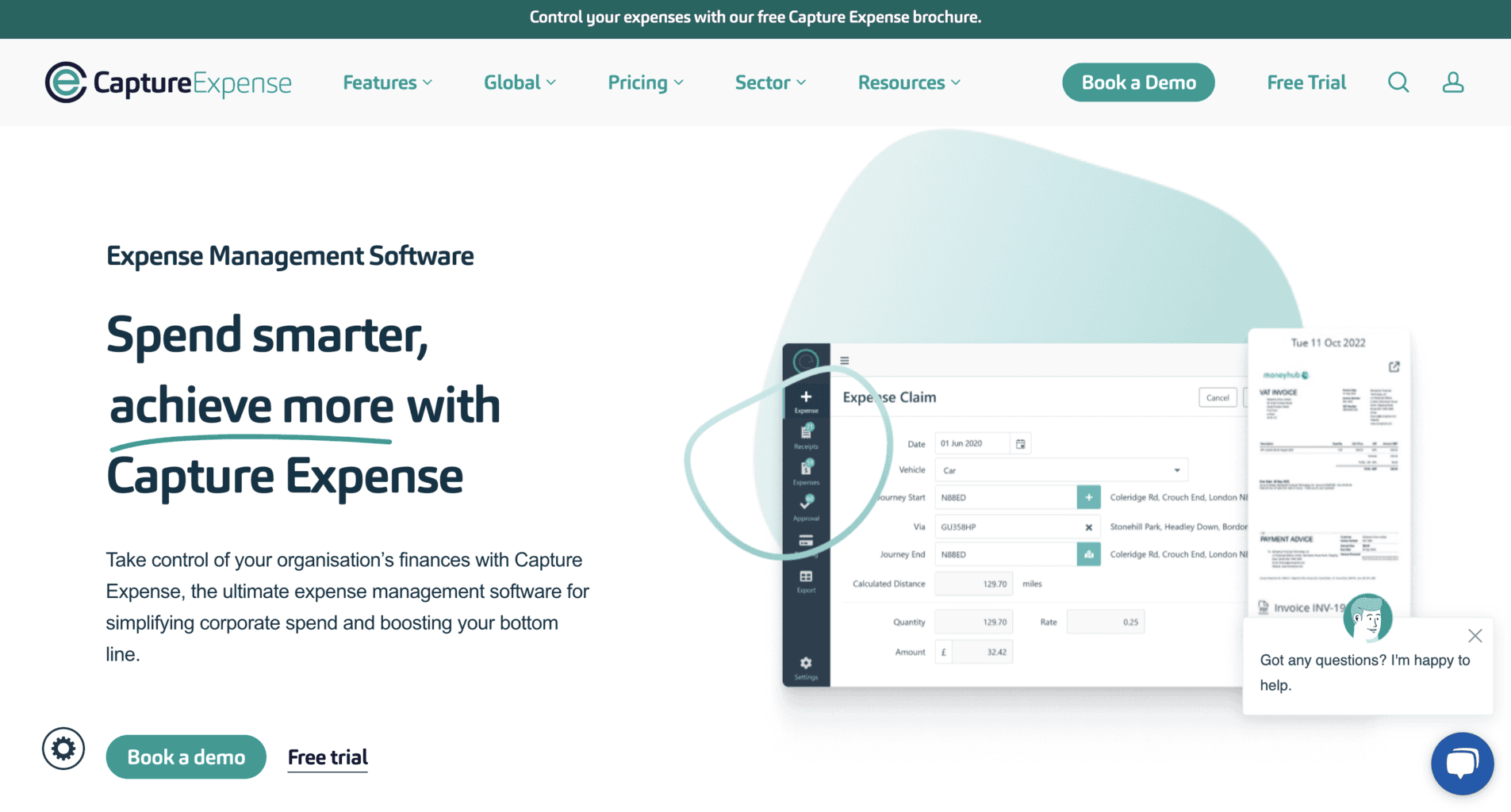
Capture Expense is a London-based expense management software provider for businesses of all sizes. The company’s cloud-based solutions streamline the process of tracking, managing, and reporting business expenses, helping businesses improve financial visibility and control.
Here’s all you need to know about Capture Expense’s software tools and features, and their prices and fees.
Capture Expense Software
Capture Expenses’s cloud-based software is available via their official website and free mobile app.
The app can be downloaded via Google Play for Android and via the Apple Store for Apple devices.
The company’s expense management software utilizes AI and ERP technologies. It can be optimised and tailored to meet the wants and needs of businesses that offer education, engineering, and construction services.
According to the company’s findings, the software helps businesses achieve the following:
- Save approximately 75% of work time by automating daily tasks that were previously done manually
- Reduce daily expenses by 44% through improved control over their staff’s spending
- Decrease administrative daily tasks by approximately 60% due to expense management automation
- More successful claims for VAT returns
Now that we’ve covered the basics, let’s learn more about Capture Expense’s tools and features.
Receipt Image Scanner Tool
The receipt image scanner tool allows you to quickly scan images within seconds and save them in your receipt archives on the software’s dashboard.
This user-friendly tool is only available via the mobile app for Android and Apple devices, and you can use it on the go. All you have to do is open the mobile app to take a snap of receipt images instead of uploading an existing photo. Once the app scans the receipt image, it’s automatically saved in the archive, which updates in real-time.
The receipt data is extracted automatically and included in the real-time updated reports on multiple expense categories.
Cash Reimbursements
Capture Expense’s software allows you to automate cash reimbursements and send money to your employees within seconds.
Your staff can upload a photo of the receipt or take a quick snap straight from the mobile app. Once there’s s a receipt image, the software will automatically extract the necessary data and save it in the receipt archive.
After the data extraction process is successfully done, you’ll receive a reimbursement request from your employees. You can either approve or reject it straight from the mobile app or website.
Corporate Card Sync
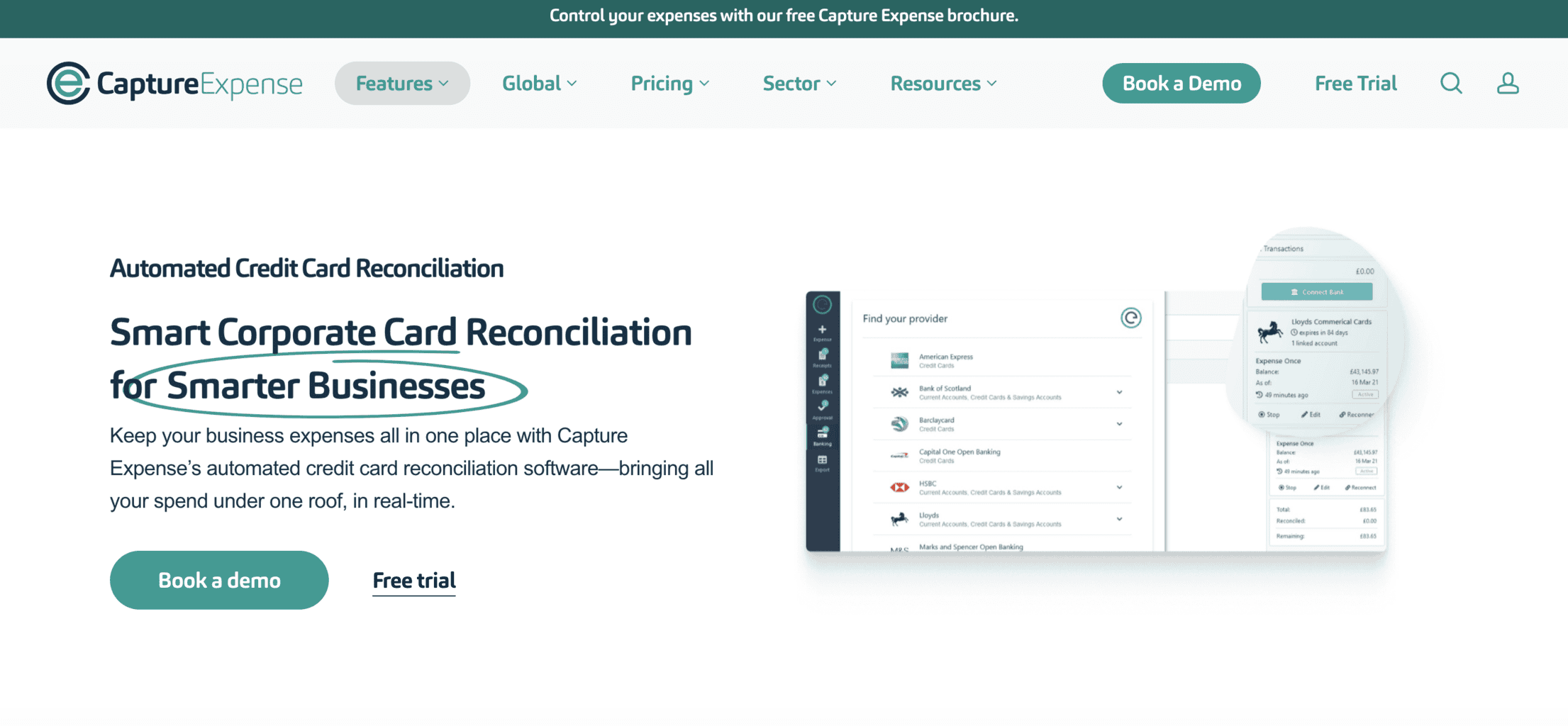
Sync multiple existing corporate cards to the Capture Expense software for reconciliation. Some of the banks and card-distributors that can connect with your Capture Expense account include MiVision, ClearSpend, and Barclaycard, among others.
Once you sync the corporate cards, all of the transactions, incoming and outgoing money transfers, receipt images, and accounts payable (invoices) created using one of the cards will appear on your Capture Expense dashboard, updated in real time.
To approve your business account for the reconciliation process, Capture Expense requires:
- Bank statements on your card spending
- Accounts payable and receipt images
- Accounting, bookkeeping, and ledger data reports and records
- Expense data reports on your staff, reimbursements, payments, etc.
Mileage Expenses
Use Capture Expense’s mobile app to track and monitor your mileage expenses while on a business trip. This calculator tool gives you an overview of multiple expense categories and ensures you reimburse employees correctly for business-related spending.
It contains a vehicle archive where you can browse through vehicle-related expenses. You can also use it to create tax and VAT reclaims with the help of the pre-built tracker that can automatically calculate the mileage expense tax, depending on the vehicle used for the trip.
Moreover, the tool can spot whenever an employee manually tries to change the pre-calculated mileage. Therefore, you’ll be able to instantly find out if someone’s trying to misuse the mileage reimbursement company guidelines.
Also, there’s an option to use the mileage expense tool to review fuel fees and rates approved by and compliant with HM Revenue & Customs (HMRC).
Third-Party Integrations
Capture Expense’s software supports API-based third-party integrations for bookkeeping, accounting, banking and finance management, eCommerce, human resources, email management, etc.
You can choose from over 50 integrations to tailor your software and personalise your Capture Expense experience. Each employee can add the integrations they’re interested in their Capture Expense dashboard.
Once you start syncing the third-party integrations, you and your employees can automate many daily tasks and have a real-time updated overview of all your company expenses from one dashboard.
Some of Capture Expense’s partners that offer third-party apps and integrations include:
- Microsoft
- Zync
- Xero
- Cintra
- Moneyhub
ROI Calculator
The return on investment (ROI) calculator tool allows you to find out how much of your unclaimed value-added tax you can get in return. You can use the tool from the cloud-based platform and the mobile app.
Most UK-based companies lose approximately 12% of their VAT due to:
- Missing data and inaccurate information
- Not using expense management software with an ROI calculator tool
According to Capture Expense’s findings, approximately 50% of unclaimed and unsigned VAT is due to these reasons. To avoid that, you can use this tool to calculate the percentage of unclaimed return added value you can get back daily.
Spending Tracking
With the help of Capture Expense’s spend control tool, you can track your employees’ spending to ensure it’s compliant with your company’s regulations. It can also help you avoid overspending on company-related payments since you’ll have an overview of your staff’s spending 24/7.
This tool also lets you do the following:
- Enforce customized spending policies
- Create spending limits for specific staff members
- Notify staff about non-compliant expense requests
- Process payment requests for amounts exceeding spending limits
Expense Data Reports
Download and review expense data reports automatically updated in real-time by using the report feature.
You can download reports on multiple expense categories, such as:
- User accounts
- Mileage expenses
- Processed and unprocessed accounts payable, i.e. invoices
- Categorised payments in a specific timeframe
- Incoming and outgoing money transfers
- Full expenditure
Since the expense data is updated in real-time, you can see the latest changes in each report. The data results are measurable so that you can conduct specific analyses, spot specific spending trends, and forecast future budgets.
Software Security
Capture Expense’s expense management software is ISO compliant and has level three of CSA STAR. The company’s data is automatically stored and kept safe in three locations across the United Kingdom.
Capture Expense ensures its digital solutions are always safe from third-party breaches and fraud by using Microsoft 365 Security and Compliance. The security software tracks and monitors unexpected spending and money transactions, automatically reviews expense records, keeps personal data encrypted, and more.
As an extra layer of security, you can use dual-faction authentication and authorisation with public key cryptography when you log in to your Capture Expense account.
In addition to being ISO compliant, the company is registered in the ICO and compliant with the GDPR rules, as well as certified and approved by Cyber Essentials. On top of that, the company uses Microsoft Azure, which is currently known as the leading cloud-based infrastructure.
Onboarding and Customer Support
Capture Expense offers online expert onboarding help. If you subscribe to the plan with a personalised quote, you’ll also receive a dedicated manager who will keep track of your account’s daily tasks and responsibilities.
You can also contact the company via phone during workdays for customer support regarding the onboarding process and ongoing customer service needs.
Additional Features
Capture Expense has two additional features – the Global Expense tool available on the mobile app and the Ireland version of the expense management software. Let’s learn more about them.
Global Expenses
With the Global Expenses management tool, you can optimise international spending by enabling money transfers in more than 100 international currencies.
Global Expenses allows you to enforce customisable company guidelines and policies for multiple categories, such as work departments, staff members, various branch locations, etc.
With Global Expenses, you can:
- Reduce and review international fees categorised in a list
- Streamline regional and local money transfers
- Transfer money within seconds at low FX fees
- Integrate the software with ERPs
- Export company transactions and sync them with auxiliary GL accounts
To test Global Expenses before subscribing, apply for a free demo trial via the website.
The Global Expenses software reviews the FX rates and fees using an AI-powered integration called Xe, which is also known as the safest data provider worldwide.
This integration gives you access to reliable FX data you can review whenever staff members pay with company money internationally.
The software immediately spots suspicious, unnecessary, or international money transactions. For example, if your employees are on a business trip and must pay in a foreign currency, the software will notify you that this specific transaction must occur in the local currency. Once you approve this and your employees receive a notification, they can proceed with the payment.
Travel and Expense Management Software Ireland
The Ireland travel and expense management software is specifically designed for Irish-registered companies to track their daily expenses. The tool is compliant with a batch of pre-set revenue rules and guidelines.
You can use this software to do the following:
- Review fuel fees and rates from a list of vehicles and their average fuel cost – the list is updated in real-time as the fuel fees are constantly changing
- Download expense reports and track employees’ spending
- Access data reports for enterprise resource planning (ERP) processes and download reports on travel, remote tasks, benefits, work exceptions, etc.
- Sync with third-party integrations for bookkeeping and accounting management, such as Sage, Cintra Exchequer, and Xero
Prices and Fees
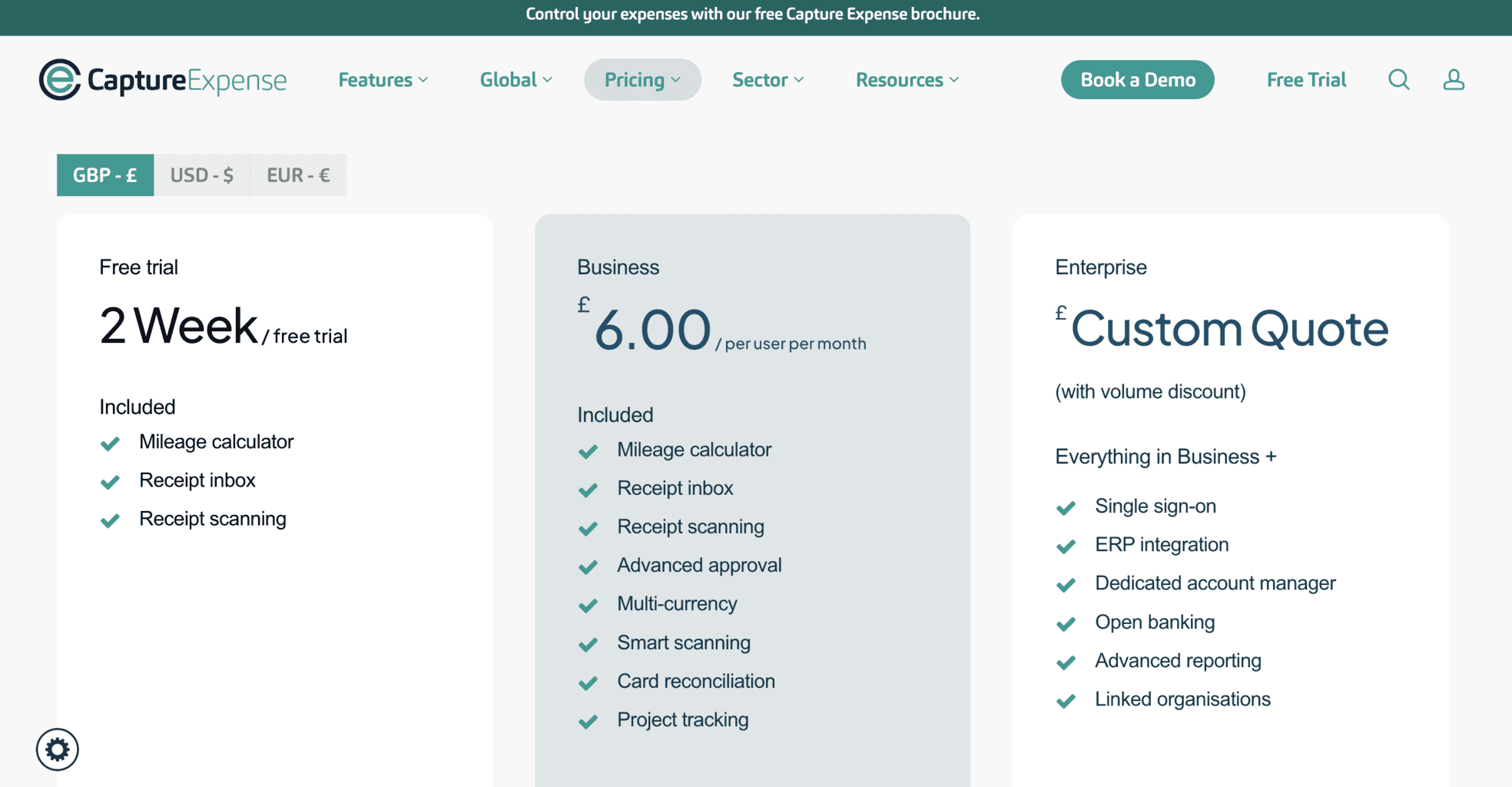
Capture Expense has three subscription plans: Free Trial, Enterprise, and Business.
Free Trial
If you’re a small business without experience with expense management software, you can start your Capture Expense journey by signing up for the free trial plan.
The Free subscription plan lasts only 14 days and contains only three tools and features:
- Mileage expense calculator
- Tool for receipt image scanning (accessible via the mobile app)
- Inbox for archiving receipt images
If you’re interested in testing the software for a two-week period, send your application via the company’s website.
If you have any questions about the Free trial, you can send an email to hello@captureexpense.com.
Business Plan
The Business subscription plan is ideal for small and mid-sized businesses looking for multiple tools and features for expense and payment management.
This plan costs £6.00 monthly per user, and you can create as many user accounts for your employees as you like.
This plan contains the following tools:
- Mileage expense calculator
- Inbox integration for archiving receipt images
- Payment approvals
- Multiple international currencies
- Debit and credit card management
- Tool for receipt image scanning (accessible via the mobile app)
- Project management, analysis, and tracking
To find out more about this subscription before signing up and get a detailed overview of the software from the company’s experts, you can apply to test the free demo version.
Enterprise Plan
The Enterprise plan is an ideal solution for large businesses and international enterprises looking for customisable expense management software.
This plan has no fixed price, so you’ll have to submit your application to receive a personalised quote for your business.
It contains all the tools included in the Business plan, with several extra ones, such as:
- Open-access banking feature
- Third-party integration of enterprise resource planning (ERP) software
- An expense management expert who will manage your company’s account
- Advanced-level expense data reports
- Linked/synced organisations
You can book a demo of the Enterprise plan via the website and use the same form to ask for a personalised subscription fee for the free demo trial.
Company Background
Founded in London in 2020, Capture Expense is a fintech company that provides businesses with expense management software. Their services are available internationally. James Rowell is the founder and current CEO of the company.
Some of Capture Expense’s international customers are:
- B&H Worldwide
- Citizens Advice
- Edinburgh Science
- National Education Union
- Henry Adams
- Alert Systems
- The Church of England
Capture Expense has multiple international partners, such as:
- Cyber Essentials
- Ico.
- Microsoft Azure
- Crown Commercial Service
In addition to the expense management software solution, the company offers multiple webinars, guides, and videos that can help you master the tools and features for payment and expense regulation. You can find the learning resources on their website.
You can also browse through their Q&A page to find out more about the expense management software and how to use it.
The company’s headquarters are located on the first floor at 85 Great Portland St, London W1W 7LT, UK. You can meet with a company representative from 9 a.m. to 6 p.m., Monday through Friday. To make an appointment, dial +442074619014. You can also email sales@captureexpense.com.
If you’d like to keep up with Capture Expense’s latest updates, follow their blog on the main website or their LinkedIn page.
Online Reviews
Capture Expense has 10 reviews on Capterra and GetApp and the same average score of 4.8 out of 5.0 stars. Most reviewers commented positively on the company’s software solutions and described them as user-friendly, with straightforward tools and features.
It has only five reviews on G2 and a score of 5.0 out of 5.0 stars and two reviews on the Apple Store and a median rating of 5.0 out of 5.0 stars.